How to use DB (tips, tricks and more)
MATLAB
Prerequisites
- The U19-pipeline-matlab repository is on the MATLAB path.
- The network cup drives (braininit, u19_dj) are mounted.
See the Database access section for more information.
Recommended tutorial
- Go through
U19-pipeline-matlab/tutorials/202103/session01_queries_fetches.mlxto learn the basics of DataJoint.
Useful scripts and functions for researchers
Read behavior file:
- Execute (change the key for the desired session):
matlab
 key = struct('subject_fullname', 'testuser_T06', 'session_date', '2022-04-20');
[status,data] = lab.utils.read_behavior_file(key)- If successful,
status = 1anddataholds the behavior log file.
Get behavior file location (local & for spock/scotty)
- If you only need to know the path of the behavior file, use:
matlab
 key = struct('subject_fullname', 'testuser_T06', 'session_date', '2022-04-20');
 baseDir = fetch1(acquisition.SessionStarted & key, 'new_remote_path_behavior_file');
 [bucket_path, local_path] =  lab.utils.get_path_from_official_dir(baseDir)
get_full_trial_data with SpatialTimeBlobs
- Get trial data (position, velocity, etc.) efficiently from the database.
- A newer, faster method to retrieve all trial data for multiple sessions.
- Execute:
matlab
 key = struct('subject_fullname', 'testuser_T06', 'session_date', '2022-04-20');
get_full_trial_data(key)- Get trial data from joined tables as well (e.g. TowersBlock):
matlab
 key = struct('subject_fullname', 'testuser_T06', 'session_date', '2022-04-20');
get_full_trial_data(key, behavior.TowersBlockTrial * behavior.TowersBlock)- Get data from subtasks as well (e.g. Twolickspouts subtask):
matlab
 key = struct('subject_fullname', 'efonseca_ef114_act114', 'session_date', '2023-01-11');
 all_tables = behavior.TowersBlockTrial * behavior.TowersBlock * behavior_subtask.TwolickspoutsBlockTrial * behavior_subtask.TwolickspoutsBlock
 get_full_trial_data(key, all_tables)
get stats from session
- Use this function to get behavior-file-like stats (at the trial level) for a single session or multiple sessions.
- Stats include, but are not limited to,
correct_left,correct_right,cum_correct_trials,performance,goodFraction,numPerMin,numRewardsPerMinandbias.
matlab
 key = struct('subject_fullname', 'testuser_T06', 'session_date', '2022-04-20');
 stat_struct = get_stats_from_session(key, "all")
get behaviorfile as db
- Unnests the behavior file structure into a flat trial table (with block data merged in).
matlab
 key = struct('subject_fullname', 'testuser_T06', 'session_date', '2022-04-20');
 data_struct = get_behaviorfile_as_db(key)
get time from iteration variable
- Example of how to "translate" a variable from iteration number to
trial_time. - In this case, the 1st row of the variable
licks(iteration numbers) is translated tolick_timesand then added to the original trial structure.
matlab
 key = struct('subject_fullname', 'efonseca_ef114_act114', 'session_date', '2023-01-11');
trial_data = get_full_trial_data(key, behavior.TowersBlockTrial * behavior_subtask.TwolickspoutsBlockTrial);
licks_time_struct = struct;
for i=1:length(trial_data)
    licks_time_struct(i,1).lick_times = get_time_from_iter(trial_data(i).trial_time, trial_data(i).licks(1,:));
end
trial_data = cat_struct(trial_data, licks_time_struct);
plot framerate frequency sessions
- Plot the trial-by-trial framerate of multiple sessions for comparison.
matlab
 key = 'subject_fullname like "mioffe%" and session_date > "2022-01-01" and session_date < "2022-01-30"';
 analyze_iteration_time(key)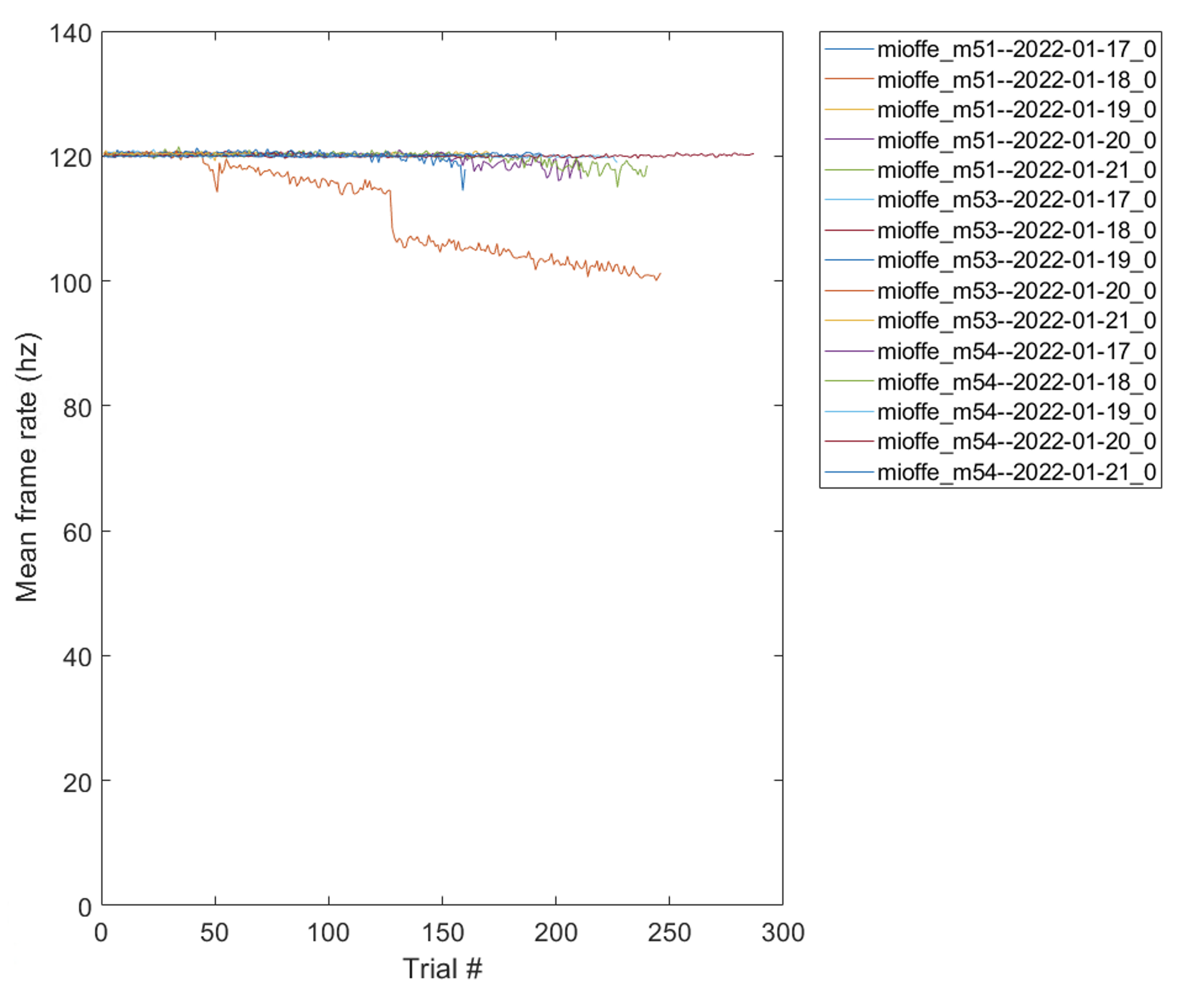
plot framerate frequency levels and rigs
- Plot the mean framerate by level and rig for multiple sessions.
matlab
 key = 'subject_fullname like "mioffe%" and session_date > "2022-01-01" and session_date < "2022-12-10"';
 analyze_iteration_time_level_rig(key)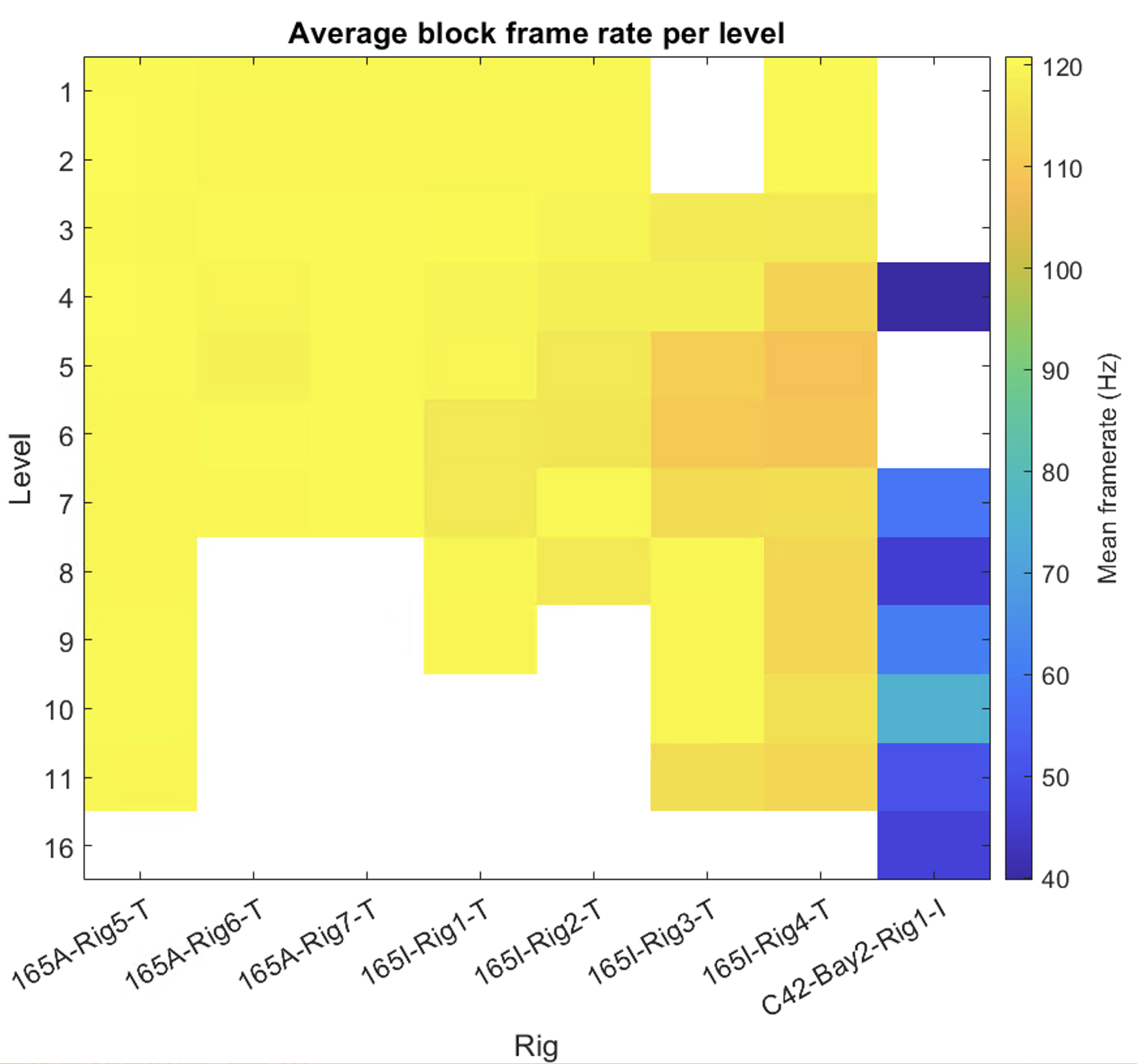
plot velocity sessions
- Plot the mean and maximum velocity per session for multiple behavior sessions.
matlab
 key = struct('subject_fullname', 'emdiamanti_gps7');
 plot_velocity_session(key)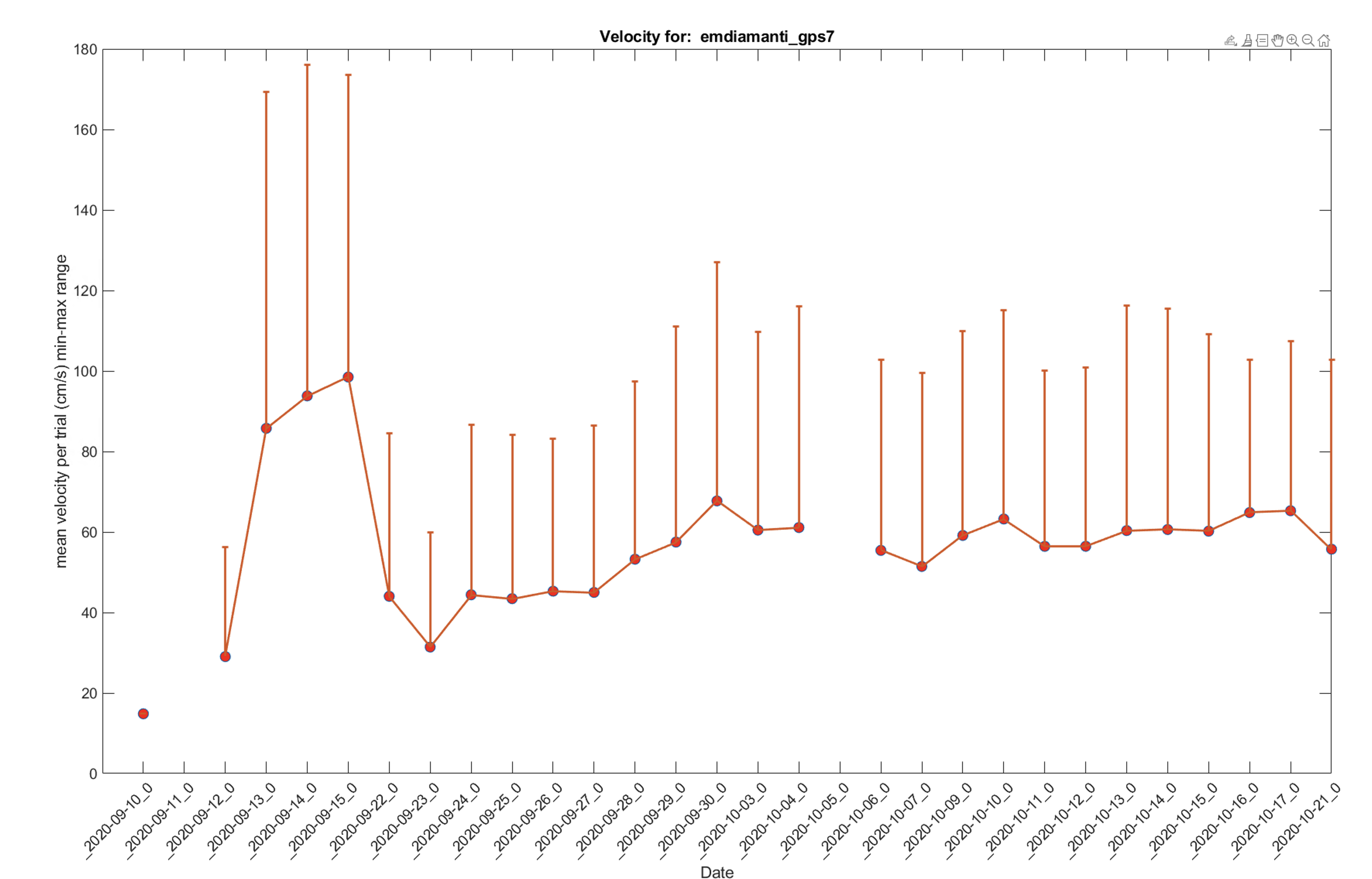
get path table
- Get the default paths for network cup drives across different OSes and spock/scotty (bucket).
matlab
 key = struct('subject_fullname', 'testuser_T06', 'session_date', '2022-04-20');
 baseDir = fetch1(acquisition.SessionStarted & key, 'new_remote_path_behavior_file');
 [bucket_path, local_path] =  lab.utils.get_path_from_official_dir(baseDir)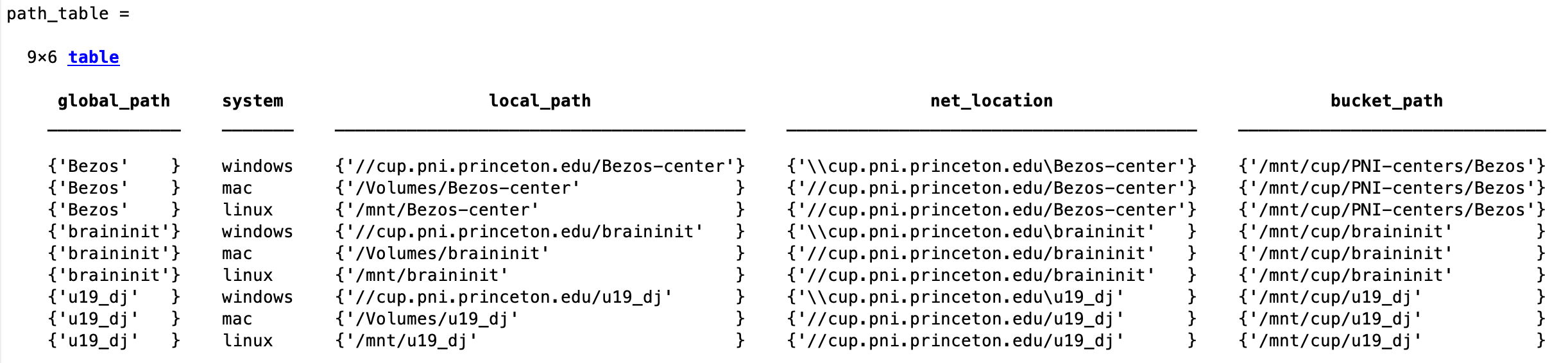
Common errors and troubleshooting
- Fetching from a table with external storage when the corresponding network cup drive is not mounted:
matlab
 Error using dj.store_plugins.File (line 89)
 Directory `/Volumes/u19_dj/external_dj_blobs` not accessible.

 Error in dj.internal.ExternalTable (line 52)
            self.spec = dj.store_plugins.(storePlugin)(config);
matlab
 Error using fread
 Invalid file identifier. Use fopen to generate a valid file identifier.

 Error in dj.store_plugins.File.download_buffer (line 63)
result = fread(fileID);- Mount all the cup drives and try again.
- The key references more than one session, but the function only works on a single session:
matlab
  Error using dj.internal.GeneralRelvar/fetch1 (line 250)
fetch1 can only retrieve a single existing tuple.- Change the key so it references a single session.