Configure custom slack alerts
Set up custom slack alerts
- Follow the Database Access with Python instructions.
- In the U19-pipeline-python repository, open the
u19_pipeline/alert_system/custom_alertsdirectory. - Create a new Python file with a meaningful name for the alert (e.g.
subject_bias.py). - Copy the skeleton code from
u19_pipeline/alert_system/alert_code_skeleton.py.- All Slack alert code has two parts: a Slack channel configuration and a main function, described in the next sections.
main function guide
- This function should return a pandas DataFrame in which each row is a Slack alert message to send to the configured channels.
- You can use DataJoint to get data for the alert (e.g.
custom_alerts/rig_bias.py) or simply call OS scripts (e.g.custom_alerts/braininit_storage.py). - All columns of the DataFrame are included in the alert (don't add too many!).
- DataFrame example with a Slack notification message:

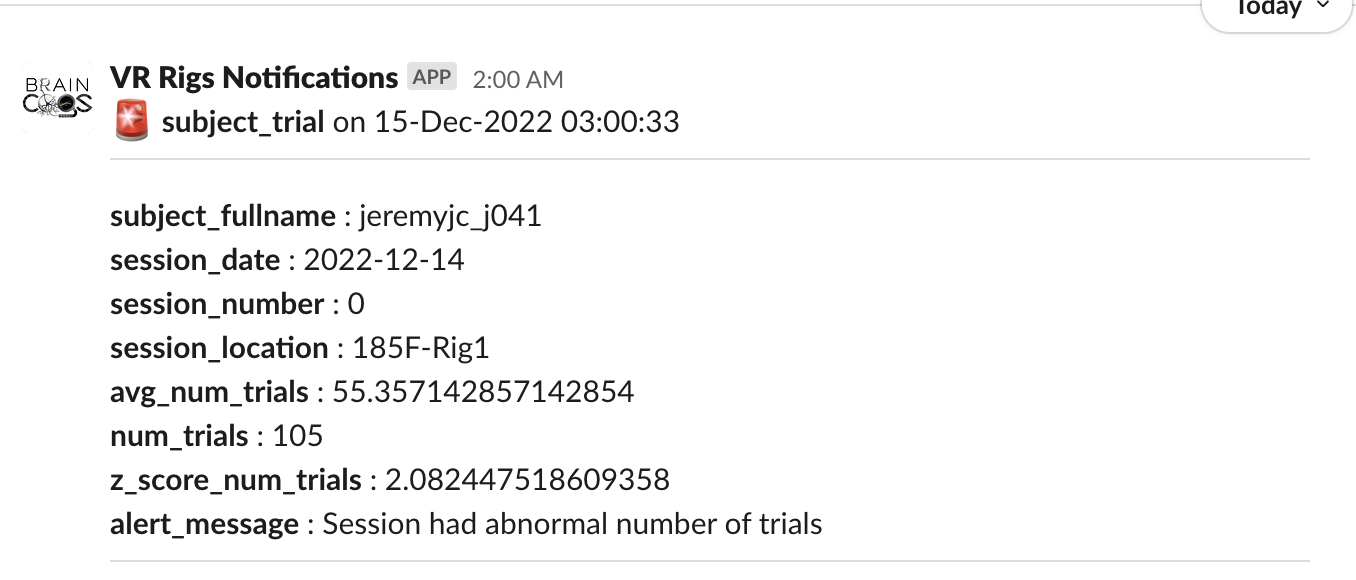
- You can find example alerts in the
u19_pipeline/alert_system/custom_alertsdirectory.
Slack channel dictionary configuration
- The Slack channel configuration is a dictionary that links the corresponding Slack channels and conversations with a specific alert.
- The dictionary has two keys, each taking a list of channels:
slack_notification_channel: general channels to send notifications to; anywebhook_name(see the next section).slack_users_channel: users to send private direct messages to; anyuser_idwith a configuredslack_webhook(see the next section).
Check available notification channels:
MATLAB
- Execute
fetch(lab.SlackWebhooks,'*').
Python
- Execute:
lab = dj.create_virtual_module('lab', 'u19_lab')lab.SlackWebhooks.fetch(as_dict=True)
Check available user channels:
MATLAB
- Execute:
matlab
fetch(lab.User & "slack_webhook <> ''",'slack_webhook')Python
- Execute:python
lab = dj.create_virtual_module('lab', 'u19_lab')
(lab.User & "slack_webhook <> ''").fetch('KEY', 'slack_webhook', as_dict=True)
Create and register new webhooks for alerts:
- Create a new Slack channel if needed (for notification channels).
- Follow the instructions to create webhooks from the Slack documentation.
- Copy the webhook URL from the Slack API web page.
Add notification channels:
MATLAB
matlab
new_slack_webhook = struct
new_slack_webhook.webhook_name = (notification channel name)
new_slack_webhook.webhook_url  = (webhook url from slack API)
insert(lab.SlackWebhooks,new_slack_webhook)
Python
python
lab = dj.create_virtual_module('lab', 'u19_lab')
new_slack_webhook = dict()
new_slack_webhook['webhook_name'] = (notification channel name)
new_slack_webhook['webhook_url']  = (webhook url from slack API)
lab.SlackWebhooks.insert1(new_slack_webhook)
Update a user's notification webhook:
MATLAB
matlab
user = struct
user.user_id = (NETID of user)
update(lab.User & user,'slack_webhook', (webhook url from slack API))
Python
python
lab = dj.create_virtual_module('lab', 'u19_lab')
user = dict()
user['user_id'] = (NETID of user)
user['slack_webhook'] = (webhook url from slack API)
lab.User.update1(user)